1. Output drops 25% year-on-year
The most reliable way to spot underperformance is to compare your generation meter reading for the same month last year. A drop of more than 25% indicates a serious fault that needs investigation. Normal year-on-year degradation for a well-maintained system is around 0.5–1% per year, so any larger drop is not routine ageing.
- Check your generation meter reading daily and log it in a spreadsheet or app.
- Compare the same calendar month year-on-year, not just total annual output.
- Use the Energy Saving Trust’s solar calculator to estimate expected output for your roof size and location (Energy Saving Trust, 2026).
2. Inverter shows red or orange light
Your inverter is the system’s main indicator of health. A solid or flashing green light means normal operation. A red or orange light, or no light at all, means the inverter has detected a fault and is not generating electricity. This is the single most common sign of underperformance and often the easiest to fix.
- Check the inverter display every few days, especially after heavy rain or storms.
- Refer to the manufacturer’s manual for fault codes; most inverters show a code on the screen.
- Contact your installer if the light does not return to green within 24 hours (MCS, 2026).
3. Generation meter reading is wrong
If your generation meter reading differs from the inverter display by more than 10%, there is likely a metering fault or wiring issue. This can mean you are being underpaid for the electricity you generate, especially under the Smart Export Guarantee or Feed-in Tariff.
- Compare the meter reading with the inverter display at the same time each day.
- A difference of more than 10% warrants a call to your installer or metering provider.
- Faulty meters can be replaced under warranty if still within the guarantee period (MCS, 2026).
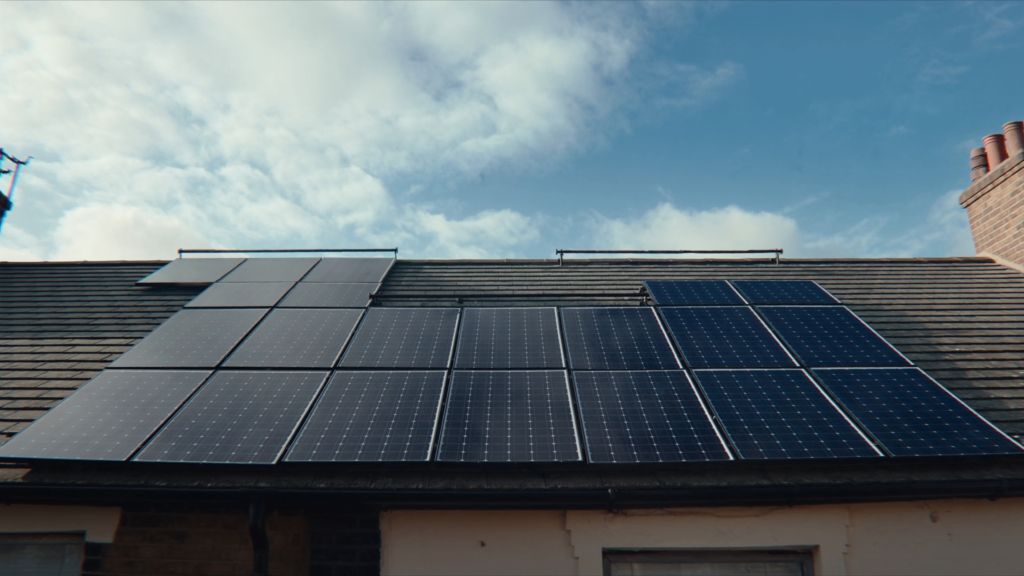
4. Panels look dirty or have bird droppings
Heavy grime, moss, or bird droppings can block sunlight and reduce output by 5–15%, especially on low-tilt roofs where rain does not wash debris away. This is one of the few underperformance causes you can fix yourself without professional help.
- Inspect panels from ground level with binoculars or a drone if safe to do so.
- Clean panels with deionised water and a soft brush or squeegee; avoid abrasive tools.
- Consider professional cleaning every 2–3 years if your roof is flat or shaded by trees (Energy Saving Trust, 2026).
5. Panels have visible cracks or delamination
Hairline cracks in the glass or peeling edges (delamination) let moisture into the panel, causing permanent power loss. These defects are often caused by thermal stress, hail, or poor installation. Once moisture enters, the panel cannot be repaired and must be replaced.
- Walk around your array on a sunny day and look for cracks, bubbles, or yellowing.
- Check the warranty; most panels have a 25-year performance warranty that covers manufacturing defects.
- Report any visible damage to your installer immediately (MCS, 2026).
6. Shading appears from new trees or extensions
New shading from growing trees, a neighbour’s extension, or a satellite dish can cut output by 20–50% on shaded panels. Even partial shading of one panel can reduce the output of the entire string if your system uses a single string inverter.
- Walk around your property at different times of day to identify new shade sources.
- Trim trees or remove obstructions if possible; if not, consider adding power optimisers or microinverters.
- The Energy Saving Trust advises that even 10% shading can reduce total system output by 20% (Energy Saving Trust, 2026).
7. Energy bills are higher than expected
If your electricity bill has not dropped by at least 30% since installation, your panels may be generating less than expected. This is a rough but practical check. Actual savings depend on your usage patterns, but a persistent lack of bill reduction is a red flag.
- Compare your quarterly or monthly bills before and after installation.
- Adjust for changes in energy use, such as adding an electric car or heat pump.
- Ofgem’s typical solar savings benchmark suggests a 30–50% reduction for a well-performing 4kWp system (Ofgem, 2026).
8. Inverter is older than 10 years
Inverters typically last 10–12 years. After this point, efficiency drops and the risk of complete failure rises sharply. An old inverter can silently underperform without showing a red light, costing you generation you might not notice until the bill arrives.
- Check the installation date on your inverter label or paperwork.
- If your inverter is over 10 years old, budget for a replacement within the next 1–2 years.
- MCS recommends replacing inverters proactively to avoid extended downtime (MCS, 2026).
9. Panels are hotter than surrounding ones
A single panel that feels noticeably hotter on a sunny day may have a bypass diode fault or a hotspot. This reduces the output of that panel and can affect the whole string. Hotspots are caused by cell damage, shading, or manufacturing defects.
- On a sunny afternoon, carefully touch the back of each panel (if accessible) or use an infrared thermometer from ground level.
- A temperature difference of more than 10°C above the surrounding panels is a fault indicator.
- MCS guidance recommends thermal imaging for accurate diagnosis (MCS, 2026).
10. You see no generation on cloudy days
Solar panels still produce 10–25% of their rated output in overcast UK weather. If you see zero generation on a cloudy day, your inverter or wiring has likely failed. This is a more urgent sign than a simple drop in output.
- Check your inverter display or generation meter on an overcast day; any reading above zero is normal.
- Zero generation on a cloudy day means the inverter is not converting DC to AC power.
- The Energy Saving Trust notes that UK panels generate on cloudy days, so zero output is never normal (Energy Saving Trust, 2026).
| Check point | Healthy range | Underperformance sign | Source |
|---|---|---|---|
| Annual output (4kWp) | 3,400–4,200 kWh | Below 2,800 kWh | Energy Saving Trust |
| Inverter status light | Green (solid or flashing) | Red, orange, or no light | MCS |
| Generation meter reading | Matches inverter display | Differs by >10% | MCS |
| Panel temperature (peak sun) | 25–45°C above ambient | >55°C (hotspot risk) | MCS / CIBSE guide |
Checking these 10 signs regularly can save you hundreds of pounds in missed generation and export payments. If you spot any of these issues, start with the simplest fix cleaning or checking the inverter before calling an installer. how to read your solar inverter display solar panel cleaning guide Smart Export Guarantee explained
Frequently Asked Questions
The clearest sign is a generation meter reading 25% lower than the same month last year. Also check your inverter for a red or orange light, which indicates a fault. The Energy Saving Trust recommends comparing meter data monthly to spot issues early.
A red or orange light on your inverter means it has detected a fault and stopped generating electricity. This is the most common sign of underperformance and often requires a call to your installer. MCS guidelines say to contact your installer if the light does not return to green within 24 hours.
Yes, heavy grime, moss, or bird droppings can block sunlight and reduce output by 5–15%, especially on low-tilt roofs. Regular cleaning, particularly after prolonged dry spells, can restore performance. The Energy Saving Trust notes that dirt buildup is a common but reversible cause of underperformance.
Normal year-on-year degradation for a well-maintained system is around 0.5–1% per year. A drop of more than 25% in annual output is not routine ageing and indicates a fault. Ofgem recommends logging generation data to distinguish normal degradation from underperformance.
The Smart Export Guarantee pays you for electricity you export to the grid. If your generation meter reading is wrong, you may be underpaid. MCS advises comparing your meter reading with the inverter display; a difference of more than 10% warrants a call to your provider.